
Personalization is one of the biggest trends in online marketing right now. Whether it’s personalizing websites, social media content, or emails, more and more marketers are trying to use customer data to send relevant emails.
In this article, we’ll cover nine simple ways to personalize your email marketing campaigns, increase subscriber engagement, and improve conversion rates. Personalizing your email marketing is essential to building strong customer relationships and enhancing brand loyalty.
By tailoring your email content to each subscriber’s interests and preferences, you can create a more engaging and effective email marketing strategy. Here are nine easy-to-implement tactics for personalizing your email marketing campaigns.
How to get the necessary customer data for email personalization
Let’s start with the basics. The key to email personalization is segmentation: dividing your subscriber list into smaller, more specific groups based on factors such as demographics, behavior, interests, and preferences.
Most email marketing platforms offer segmentation tools to choose the right data for email marketing personalization. You can pull identity, engagement, ecommerce, and sentiment data to test multiple email personalization strategies.

What are the benefits of personalization in email marketing?
Relevant content. By understanding the distinct characteristics of each segment, you can create tailored content that speaks directly to their needs, preferences, and pain points. This increases the likelihood that your emails will resonate with your audience and lead to higher engagement.
Improved open and click-through rates. When subscribers receive content that is relevant and interesting to them, they are more likely to open your emails and click on the links within. This can lead to improved open (30.26% vs. 26.55%) and click-through rates (2.7% vs. 2.1%), as shown by the data from the Email Marketing Benchmarks report.
Are you looking for a cost-effective and convenient way to gather data from your audience? These articles will help you collect as much data as you need to send relevant messages:
How to generate leads through progressive profiling
The ultimate guide to email surveys: benefits, types, and best practices
Increased conversions. Personalized emails that address the specific needs and interests of each segment are more likely to motivate recipients to take the desired action, such as making a purchase, signing up for a webinar, or downloading a resource. This results in higher conversion rates and a better return on investment for your email marketing efforts.
Enhanced customer relationships. Sending targeted, personalized emails shows your subscribers that you understand their needs and preferences, leading to stronger customer relationships and increased brand loyalty.
Reduced unsubscribe rates. By providing relevant content tailored to each segment, you decrease the chances of subscribers losing interest in your emails and opting out of your mailing list.
Benefits of personalizing emails
The most curious thing about personalization is how more and more consumers report they want more personalized marketing messages. Some of them even expect it.

How nearly 2,000 email subscribers answered the question, “Q: In which of the following ways, if any, would you like company emails to change? Please select all that apply.” More personalization was the second-most requested change.

With personalization on the rise, with customers requesting it, and with all the reports of great results from personalization, you’d think almost every email would be using it. So why are so many email marketers still stuck in personalization 101? Why are we still thinking of personalization as just using someone’s first name in the subject line? We’re working with one of the most flexible, testable and customizable marketing channels on the planet. It should be considered as one of the basics of email marketing.

Personalizing a subject line like this is a good start, but there’s way more you can do.
Part of the reason we’re hanging back may be because we know that adding a first name to a subject line now and again is likely to lift open rates. It’s also fairly easy to add that first name. And it’s data most of us have. Why not do it?

Well, because in some cases, personalizing the subject line can actually hurt results. That’s what we found when we analyzed the data in the 2023 Email Marketing Benchmarks report.
Emails that contained a personalized element in the subject line saw 23% lower opens and 48% fewer clicks!
So, what’s a marketer to do? Not personalize at all?
No. You should definitely keep personalizing. But it’s time to try something more creative than the first name in the subject line. There are all sorts of personalization tricks you can apply to your emails. The ones I’ve picked for this blog post don’t require fancy information merges. You don’t need peoples’ past order histories or download records to do anything I’ll describe here.
Just by “borrowing” a few ideas from some cool emails I’ve come across, I think we can get you thinking outside the subject line. Actually, I bet you’ll be able to think of a couple more personalization tactics by the time you’ve read this post through. But these nine ideas are enough to get us started.
1) Use the subscriber’s name in the subject line and email body
This is actually the #1 place I’m seeing first names used. It’s just as simple to insert a first name into the salutation as it is to insert it into the subject line.

Notice how this first name begins with a lowercase letter. You might want to clean up the data from your forms a bit and capitalize each first name before you send a mailing out.
2) Personalize graphic assets in your emails
Personalizing graphics and GIFs in marketing emails can significantly increase engagement and make your content more appealing to your subscribers.
Tailor imagery to audience segments. Use different images or GIFs for different subscriber segments based on their demographics, interests, or preferences. For example, you can use images that reflect the age group, geographic location, or hobbies of a particular segment to make the visuals more relatable.
Reflect on recent interactions. Use visuals related to the subscriber’s recent browsing or purchase history to make the content more relevant. For instance, you can include a GIF showcasing the product they recently viewed or added to their cart. Existing customers will appreciate more personalized email marketing: receiving relevant content and not getting irrelevant messages.
Encourage customers to share content and fuel your emails with user-generated content. Include images or GIFs created by your customers or followers, which can showcase real-life experiences with your products or services. This not only adds a personal touch but also helps build trust and credibility.
Incorporating someone’s name into an image might be a way to grab subscribers’ attention. It works because we’re drawn to images (sorry about the pun), and so we’re more likely to see our name if it’s in an image.
This is a fairly new trick, so it may work simply because subscribers aren’t used to it yet. Sometimes, just adding something beyond the typical hum-drum email gets attention.
Here’s an example of a personalized image that includes the subscriber’s name (repeated three times) created using a tool from NiftyImages.com.

Pro tip: To add a personalized image like the one above to your GetResponse email, you must first create it in NiftyImages. Once you’ve done that, copy the code you received from them into a custom HTML block inside GetResponse.

Note that the syntax you receive from Niftyimages needs to be slightly adjusted to fit GetResponse’s new syntax.
Here’s the original code we got:
1<img src="https://img1.niftyimages.com/ay1/6a-i/wvp5?name=[[firstname]]">And here’s the updated version, using the new syntax:
1<img src="https://img1.niftyimages.com/ay1/6a-i/wvp5?name={{CONTACT `subscriber_first_name`}}">
Download our ebook!
Would you like to learn how you can personalize images in your email campaigns? Read our ebook by NiftyImages!
3) Personalize the preheader text
Preheader text is known as “the second subject line”. So why not personalize it? Here’s another reason to personalize it: Half of all emails are opened on mobile devices. And the preheader text takes up more space than the subject line on many mobile devices.
Bonus idea: Personalize the postscript in your email. You know, the “PS:” at the close? Postscripts often get read more than body copy.
4) Use dynamic content for personalized experiences
Dynamic content refers to the practice of automatically customizing email content based on individual subscriber data, resulting in a highly personalized email experience.
Say you’ve got a bunch of people with email addresses that end with “gmail.com”. Send an email to them that’s “just for Gmail users!”
This is even more effective if you’re in B2B and send emails to a bunch of people in a few select companies. Then you can craft a special offer or discount just for employees at those firms.
This one’s slightly more advanced, but you can achieve this using dynamic content, if you’ve stored that information in your contacts’ custom fields.
Start by gathering relevant data about your subscribers, such as demographics, preferences, browsing behavior, and purchase history.
Analyze your subscriber data to identify areas where personalization can enhance the email experience. This could include elements like the subject line, email body, product recommendations, or even the layout and design.
Group your subscribers into segments based on shared characteristics or behaviors, such as age, location, interests, or purchase history. This will help you tailor dynamic content to the specific needs and preferences of each segment.
In your email marketing platform, set up dynamic content blocks that will automatically update with personalized information for each subscriber. These blocks can include elements like personalized greetings, location-specific offers, or product recommendations based on browsing history.

If you want to learn more about this topic, here’s an article you’ll find useful: How To Personalize Your Emails with Dynamic Content
5) Add a personalized video
Services like BombBomb and Idomo can help you create personalized video emails like the one below.

Note that even these services don’t usually embed the video into the email message. Like most other marketers, they create an image that looks like a video for the email. When the subscriber clicks that image, they’re brought to a landing page where the video automatically plays.
6) Celebrate subscriber milestones with personalized emails
I got this cute email on my second “Twitterversary”. It even had an animated gif – the candle sparkled.
Why not send your subscribers “anniversary” emails? If someone stays with you even long enough to get to a first year anniversary, that’s still pretty good. They deserve a little something.

One of the proven email personalization techniques is celebrating user or customer activity. Here’a an email from LinkedIn with personalized content reminding about an approaching important milestone.
Celebrating milestones are likely to increase both customer engagement and customer loyalty.

7) Personalize by adding Gravatar profile image to your email
I mentioned earlier that we’re drawn to images. Well, we’re positively magnetized to our own image. Adding someone’s Gravatar photo, like Buffer did here, almost makes it look like you handcrafted the email.
There are instructions on how to embed a Gravatar image in an email here. If you don’t do code, they might be scary. But you could always hire a coder to set it up for you.

Adding your photo to your email helps create personal connection. We found that sending personal email invites from our marketing team members increase email engagement.

8) Use email retargeting
I said think outside the subject line, right? Well, how about thinking outside the email message and even outside the inbox. That’s what retargeting can do.
Email retargeting is a marketing strategy that involves sending targeted email messages to subscribers who have previously interacted with your brand, website, or content. The purpose of email retargeting is to re-engage and nurture these subscribers, guiding them towards a specific action, such as making a purchase, signing up for a service, or consuming more content.
Marketing automation is prefect for joining multiple data points in a meaningful way and tracking website visits and behavior triggers to send retargeting campaigns. There are several kinds of retargeting you can use in your email personalization strategy.
Website behavior-based retargeting
This approach involves tracking user behavior on your website, such as browsing specific pages, adding items to a shopping cart, or spending a certain amount of time on the site. Once certain criteria are met, you can trigger personalized emails that address the subscriber’s specific interests or actions, like product recommendations or abandoned cart reminders.
Email engagement-based retargeting
This type of retargeting focuses on subscribers’ interactions with your previous email campaigns. You can target individuals who have opened or clicked on specific emails, offering them additional content, promotions, or incentives related to the initial email.
Product or service usage-based retargeting
If your subscribers have already used your product or service, you can retarget them with triggered emails that encourage repeat purchases, upsells, cross-sells, or referrals. This can include special offers, product updates, or content that supports their ongoing usage.
Retargeting is a very popular technique right now. It may be invasive to some subscribers, but there’s no way around it: Retargeting works.
9) Send messages at just the right time for each individual subscriber with Time Travel or Perfect Timing
This one’s only for GetResponse customers. If you want to want all your emails to arrive at a specific hour, regardless of your subscribers’ time zones, choose the “Time Travel” option when you’re setting up your next email campaign. It’s on the very last setup screen, near the bottom of the page (also shown below).

Or you can go a different route and let the GetResponse system send your emails based on when each individual subscriber tends to interact with your emails. Obviously you’ll need to have sent a couple of email campaigns to your list before this works well. But if you’ve been sending emails on a regular basis, it’s definitely worth a test.
Great email examples from our team
Michał Leszczyński, Head of Content Marketing & Partnerships at GetResponse
Want to go beyond “Hey, [[firstname]]” in your email personalization journey? Then pay attention to this email from Kiva.
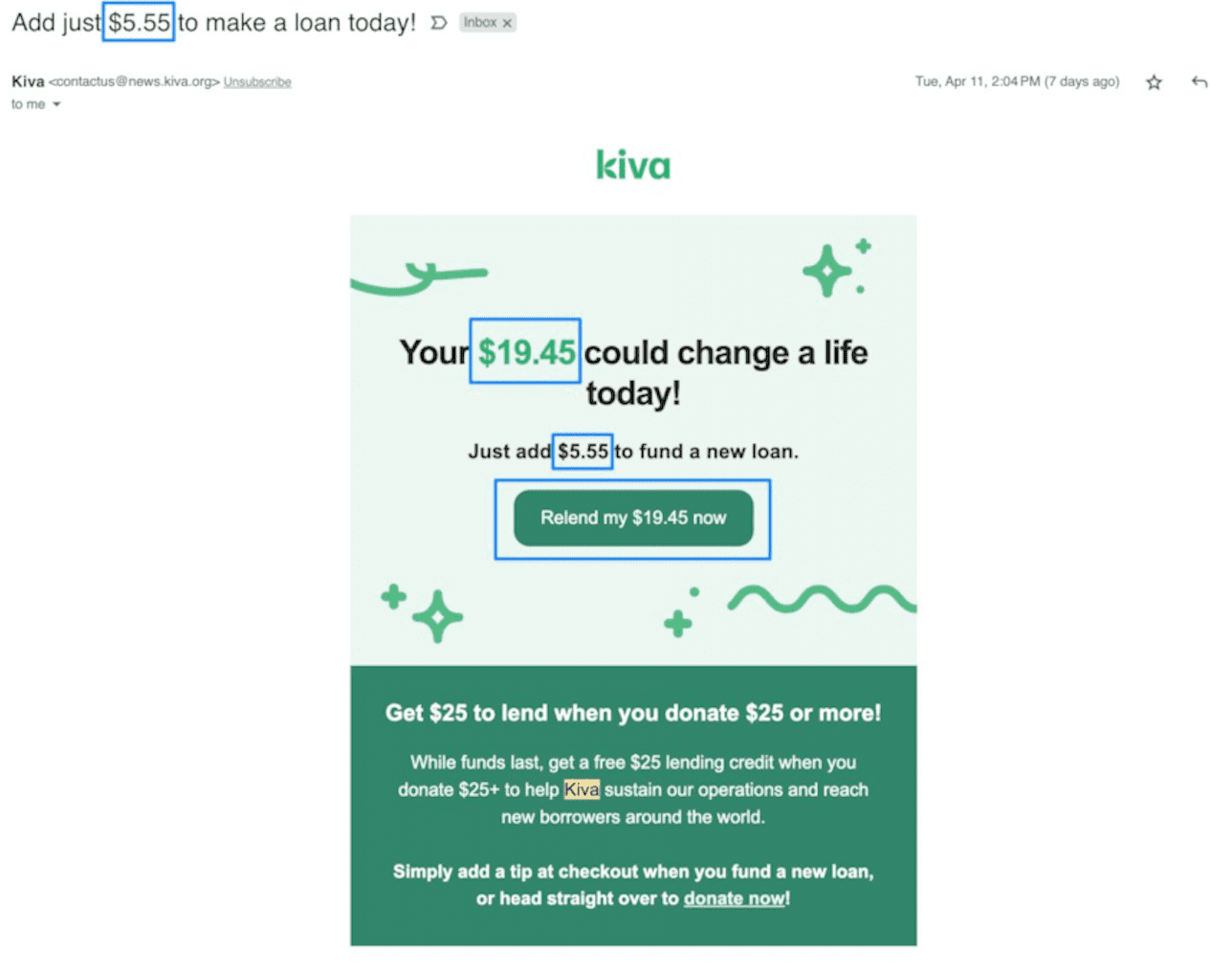
Here’s what they personalized:
- Subject line
- Headline
- Subheading
- 2x CTAs
- Recommendations
- Body copy
Best of all? They didn’t need much information to make this email feel personal. Just the $ amount I’ve got stored in my account and potentially what causes I’ve supported in the past. That’s it.
Was this message more compelling than a generic “We’d like your support” email? It worked for me. And I’m quite confident it worked for many others, too. And how can you use this for your own business? Consider what information you’ve got about your audience:
- Products they purchased
- Products they looked at
- Products they abandoned
- Products they added to their wish list
- Their date of birth
- Their city
- Their category of interest
- Their company name
- Resource they watched or signed up through
- Resource they didn’t respond to
- Event they attended
- Etc.
Start small. Try to make your message more relevant and valuable. And don’t think it’s enough to say “Hey, [[firstname]]” anymore.
Irek Klimczak, Customer Content Lead at GetResponse
I’ve picked one of the amazing emails from the Uncommon Goods (their email marketing team surely knows how to personalize emails).
This email is designed to help you choose the right gift for anyone. The idea is simple, you create an email with segments by recipient and a dedicated CTA that directs subscribers to a specific product category on your website., e.g.
- gifts for him,
- gifts for her,
- gifts for kids,
- gifts for teens,
- trending right now
- we found these for you (based on website activity)

You can segment users based on the categories they browse and send them a highly relevant follow up email once they visit your landing page. This is a simple yet effective way to start personalizing emails and unlock the true power of email.
The “More to discover” section is designed to learn more about the preferences of your target audience and use all the data to create targeted email marketing campaigns.

I bet after seeing all these ways to personalize an email, you’ve got plenty of your own ideas. How about sharing one or two of them with us in the comments?